Product adoption software
that points users at what they're missing
- A checklist for the first weekNew accounts get a short list of the steps that lead to a first win, so the product becomes a handful of things to do.
- A walkthrough at the right momentInstead of a grand tour nobody remembers, a short flow runs the first time a user needs that part of the product.
- A hotspot for the nudge in contextA beacon sits on the control that matters now and waits to be clicked, rather than interrupting what a user came to do.

Show it to the users who haven't done it yet
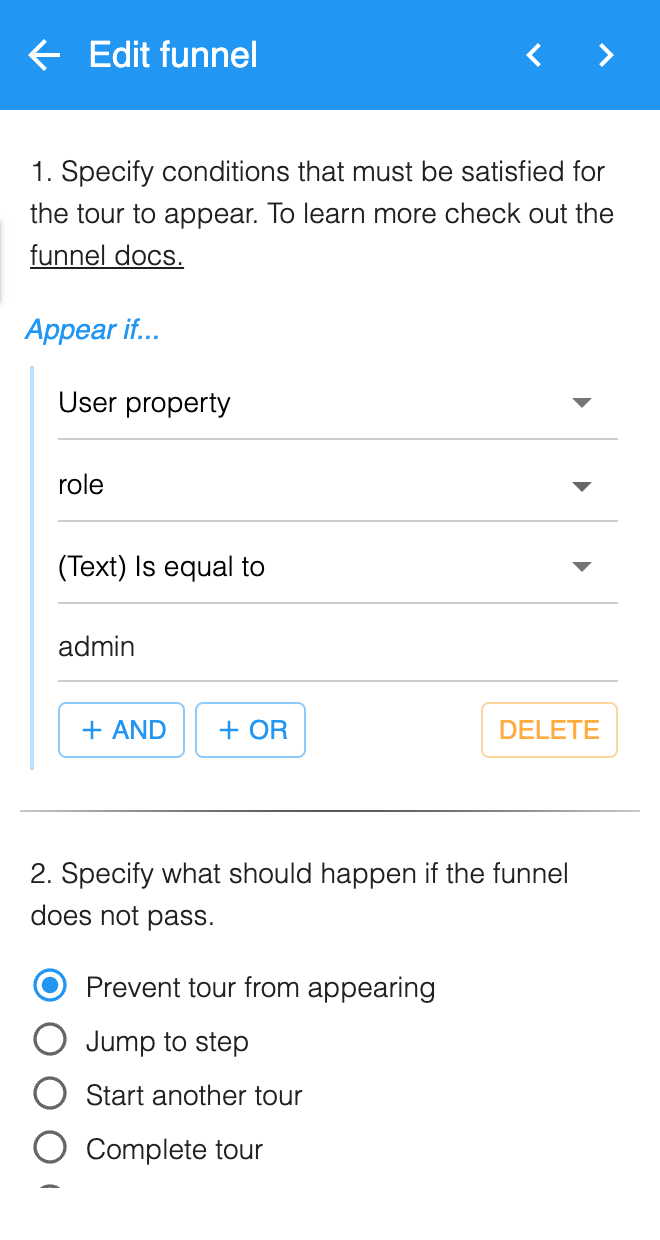
- Target on what you already knowYou can go on a user's role or plan, the events you've sent, the page they're on, their device, or whether they're new or returning.
- Sit a funnel on any stepA funnel can guard a single step rather than the whole flow, so one walkthrough serves a power user and a first-week account without becoming two flows to maintain.
- Split test before you roll it outRun two variants against each other rather than arguing about which framing will land. HelpHero tells you which version more users finished, and your analytics tool is what ties that back to real usage.
What it measures, and what it doesn't
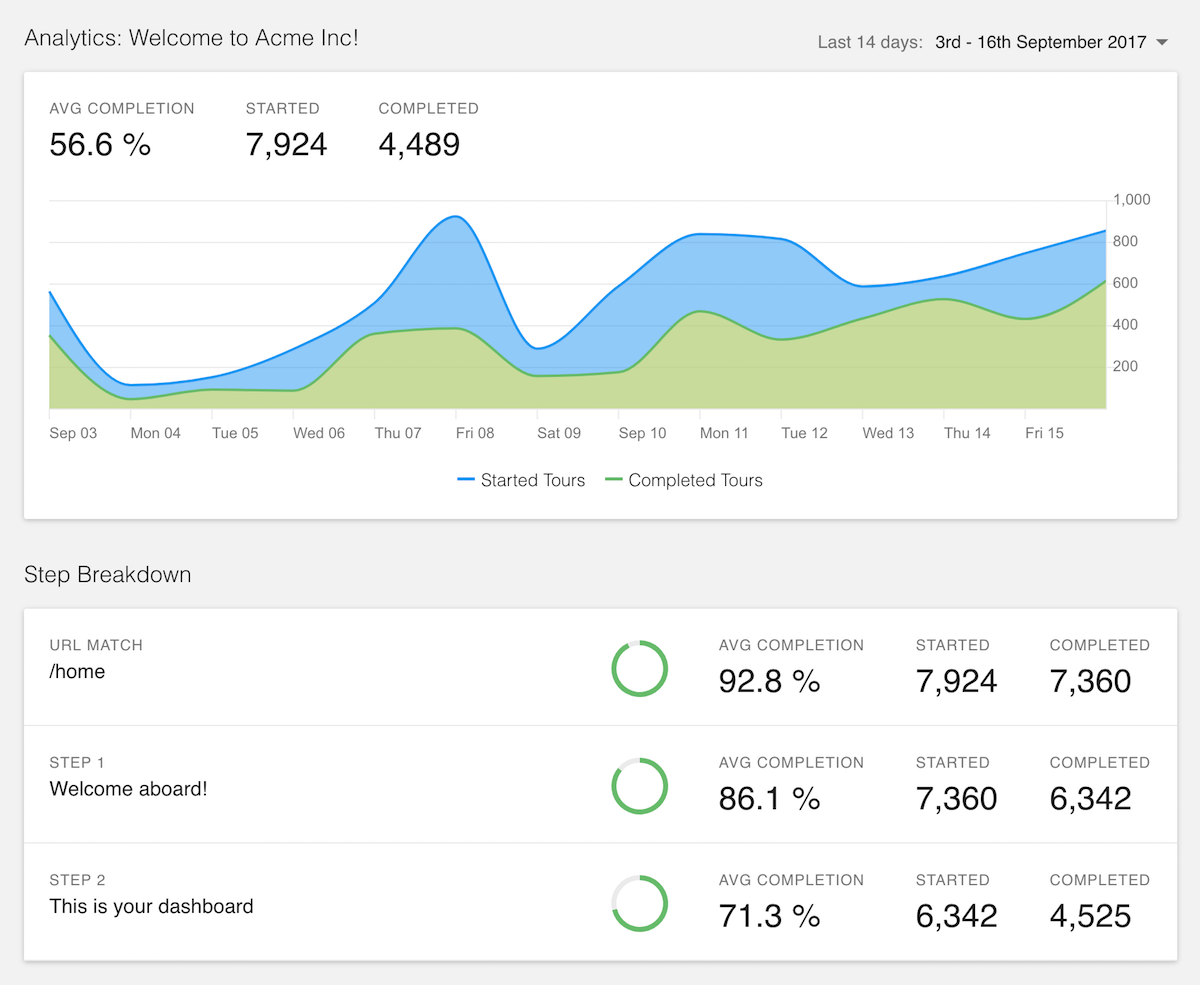
- Completion for every stepYou can see the drop between one step and the next, which points at one screen to fix instead of a whole flow to rewrite.
- Send the events onwardA few lines of the JavaScript API forward started, completed and canceled events into Google Analytics, Mixpanel or whatever you already run.
- Pair it with product analyticsYour analytics tool defines the adopted action and tracks it by cohort. You then put a checklist or a hotspot wherever that shows users aren't finding the feature.
Common questions about product adoption software
What is product adoption software?
Product adoption software helps existing users get value from more of your product, using guidance that runs inside the app rather than emails or documentation. It typically covers onboarding checklists, guided walkthroughs and hotspots, targeted so that a new account and a long-time user don't see the same prompts.
How is product adoption software different from user onboarding?
Onboarding gets a user to their first win, and adoption is everything after that. They use the same building blocks, but the timing and the audience differ: onboarding runs in the first session for users who have just signed up, while adoption work targets accounts that are already active and haven't found the feature that would make them stay.
Does product adoption software measure your adoption rate?
HelpHero doesn't, and it's worth being clear about it. HelpHero reports how your guidance performs, with completion and drop-off for every step of a tour or checklist, which tells you whether the help itself is working. Measuring adoption across your whole product means defining an adopted action and tracking it by cohort, which is a job for a product analytics tool. Use the two together rather than expecting one to do both.
How do you increase product adoption?
Find the one action that separates accounts who stay from accounts who leave, work out where users stop short of it, then put guidance at that exact point. A checklist suits the first week, a walkthrough suits the moment a feature first becomes useful, and a hotspot suits a nudge in context. Target each one so it only reaches users who haven't done the thing yet, because prompting them toward a feature they already use is how in-app guidance starts getting ignored.
Do you need a developer to run this?
Only for the install itself, not for the flows. The snippet goes in once, the way any analytics tag does, and a tag manager can carry it if that's easier than a code change. After that, product and customer success teams build and edit flows themselves, which matters because adoption work is a steady stream of small changes rather than one big launch.
How much does product adoption software cost?
HelpHero starts at $55 a month for 1,000 monthly active users, and every plan includes every feature with unlimited seats. Most of the category charges more to get started, and several vendors don't publish their paid tiers at all, quoting them on request after a call. Our comparison pages carry each vendor's own figures alongside the date we checked them.
Adoption work is a steady stream of small changes rather than one launch, so what matters is how cheaply you can make the next one. Every feature is on every plan here, seats are unlimited, and pricing starts at $55 a month, so nothing you want to try later sits behind an upgrade. Each competitor we're asked about also has a side-by-side comparison.