New Feature Announcements Users Actually Notice
Why most feature announcements get missed, what to put inside the product instead of relying on an email nobody opens, and how to tell when an announcement is the wrong tool for the job.
 Jennifer Tee6 min read
On this page
- Why do most feature announcements get missed?
- Where does an announcement actually land?
- What do you put inside the product?
- Who should see it?
- When should it go up, and how long should it stay?
- When should you not announce at all?
- What changes when you stop trying to tell everyone
- Common questions about feature announcements
Most feature announcements get missed because they happen somewhere the user isn't. You write a changelog entry and send an email, and the users who needed the feature never see either one. The fix is to put the announcement on the feature itself, inside the product, so a user runs into it while they're already working. Email and changelogs still have their uses, but both rely on a user stopping to check something outside the product, and most of them won't.
This is one part of SaaS onboarding that keeps running long after a user is onboarded. They learned the product months ago, and now something in it has changed.
Why do most feature announcements get missed?
Because announcing and being noticed are different things. You can announce a feature perfectly and still have every user miss it, and almost all the standard advice is about the announcing.
The usual playbook is an email, a changelog entry and a post somewhere. All three ask a user to be paying attention to your product while they're not using it, which is a strange thing to expect. Email shows the problem most clearly. Even a campaign that performs well by email standards still depends on a user opening it, and the users who open are not necessarily the ones who needed the feature.
The changelog has the opposite problem. It's accurate and complete, and it's read almost entirely by users who already follow the product closely. That makes it a record rather than an announcement: useful to link to when a user asks what changed, and no good at all for reaching a user who hasn't thought to ask.
Where does an announcement actually land?
Three channels, and each one reaches a different group of users.
Email reaches users who aren't in the product. That's genuinely useful when the feature is a reason to come back, and it's the only channel that reaches a user who has drifted away. It's also the channel most likely to go unopened.
A changelog reaches the users who go looking. Small group, high intent, and worth keeping accurate for them and for prospects evaluating you.
The product itself reaches whoever is working in it today. This is the one most teams underuse. A user who opens your app on Tuesday is already paying attention to it, which is more than any email can assume. Put the announcement on the feature that changed and they find it at the moment it's useful, rather than three days earlier in an inbox. It's the same surface in-app onboarding uses on a brand new user, aimed at a different moment.
You want all three, for different jobs. Retention work needs the email, because it's aimed at users who have stopped showing up. Getting a new feature adopted mostly needs the in-app one, because it's aimed at users who are already here.
What do you put inside the product?
A small beacon sitting on the button or panel that changed, which opens a line or two of explanation when a user hovers or clicks it. In HelpHero that's a hotspot, and our page on onboarding tooltips covers how the trigger and the show-once condition work.
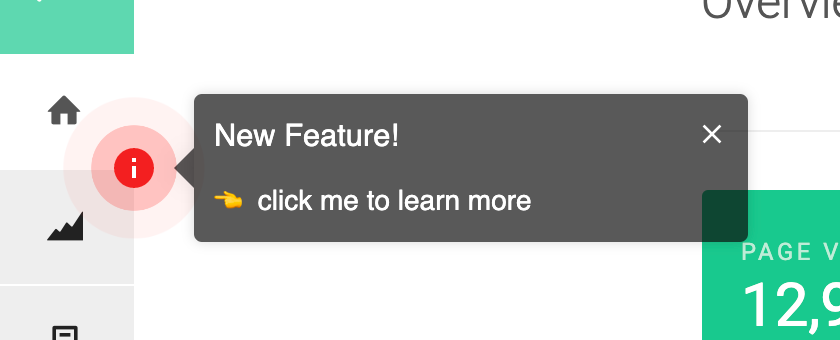
This beats a popup in the middle of the screen because it sits quietly on the page instead of covering it up. A user who is busy ignores the beacon and carries on with what they came to do. A user who was already looking at that part of the interface finds the explanation exactly when it's useful, and you never had to guess in advance which of them was which.
Keep the copy to what changed and why a user would care. An announcement is not documentation, and a beacon that opens three paragraphs will be closed unread.
Who should see it?
Fewer users than you probably think. A feature that changes an admin's workflow is noise to everyone who will never open that screen, and every irrelevant prompt makes the next relevant one slightly easier to dismiss.
Target announcements the same way you'd target any other in-app guidance: by user property, by plan, by whether they've used the feature this relates to. A trial account in week one and an admin who has been with you two years should not get the same set of prompts, and neither should a user who has already found the feature on their own.
The show-once condition matters here too. An announcement that keeps reappearing after a user has read it stops being helpful and starts being a thing they've learned to click past.
When should it go up, and how long should it stay?
Put it up when the feature is genuinely usable, which is often a few days after it merges. Announcing on release day is tempting because that's when the team is excited, but a user who follows the beacon and finds a rough edge has just been told the wrong thing about your product.
Leave it up long enough to catch users on their normal login rhythm. This is the part teams get wrong most often: an announcement that runs for three days reaches your daily users and misses every user who signs in weekly or monthly, and in most business products that second group is large. Work out how long it takes for most of your active users to sign in at least once, and treat that as the minimum.
Then remember to take it down again. An announcement that never expires stops reading as news and turns into another piece of interface a user has learned to look past, which makes the next one easier to ignore too. Show-once, from the section above, stops a user seeing it twice, but nothing decides when the announcement comes down for everybody. That call is still yours to make.
When should you not announce at all?
More often than most roadmaps assume. There are a few cases where announcing does more harm than good.
The change is self-explanatory. If a button moved slightly or a form got faster, users will work it out on their own, and pointing it out anyway just teaches them that your announcements are usually about nothing much.
The feature isn't ready to be found. An announcement pointing at something half-finished converts curiosity into disappointment, and that's harder to undo than a delayed announcement.
Nobody was asking. If a feature exists because it was on the roadmap rather than because users wanted it, an announcement won't create the demand. That's a product conversation rather than a communication one.
What changes when you stop trying to tell everyone
The question worth asking is how the users who would actually benefit from a feature come across it at a moment when they can do something about it. That is a different job from getting the word out, and it produces a different piece of work.
Getting the word out means writing one message, sending it widely, and reporting how many users opened it. Making a feature findable means putting a beacon on the feature, showing it only to the users it applies to, and checking whether they went on to use the thing. The second is harder to put in a slide and considerably more likely to work.
You can try HelpHero free and put your first announcement on the feature itself, without writing any code.
Common questions about feature announcements
How do you announce a new feature inside your app?
Put a small beacon on the feature itself, so users find it where they'd use it rather than in an email. A short line saying what changed and why it's useful is enough, and it should be targeted to the users the feature affects instead of shown to everyone.
What's the difference between a product announcement and a feature announcement?
Audience and timing. A product announcement points outward at people who aren't customers yet, and it's a marketing job: a launch page, press, a post somewhere public. A feature announcement points inward at people already using the product who now have something available that wasn't there last week. The two get confused because the same news often drives both, but the outward version is written to create interest and the inward one is written to be acted on by someone in the middle of a task.
What is the best channel for a product announcement?
It depends who you're trying to reach. Email is the only channel that works on users who aren't currently using the product, a changelog serves the small group who go looking, and in-app is the one that reaches users while they're working and able to act on it. Most teams over-invest in the first and under-invest in the third.
How long should a feature announcement be?
Short enough that a user reads it before deciding whether to bother. One or two sentences covering what changed and why they'd care, with a link to fuller documentation if the feature genuinely needs one. Anything longer than that is documentation, and it belongs in the docs.
What does a good feature announcement look like?
One line naming what changed, one line on why it matters to the person reading it, and a way to try it without leaving what they were doing. Put it on the feature rather than in a feed. A useful test before you ship it: strip out your product's name, and see whether the text still tells someone what they can now do that they couldn't do before. If it doesn't, it's describing a release rather than a change in what's possible.
How do you announce several new features at once?
Mostly, don't. A batch announcement asks the reader to work out which of five things applies to them, and most won't do that work. If a release is worth summarising, the changelog is the right home for the full list, and the one or two changes that genuinely alter how someone works each get their own beacon on the feature they belong to. Bundling is convenient for the team shipping and inconvenient for everyone reading.
Should every new feature get an announcement?
No, and treating announcements as automatic is how users learn to ignore them. Skip the ones that are self-explanatory, and skip anything that isn't finished enough to hold up when a curious user goes and tries it.
How do you measure whether an announcement worked?
Look at whether users started using the feature, rather than at how many of them saw the announcement. A view count only tells you the announcement reached the screen. The number of users who go on to use the feature over the following weeks is the thing that tells you it did its job.