Activation Rate: How to Measure It and Move It
What an activation rate measures, how to calculate it without flattering the number, and the changes that actually move it rather than just reporting on it.
 Jonas Budelmann11 min read
On this page
- What is user activation?
- Why does user activation matter so much for SaaS?
- How do you find your product's activation event?
- Where does first time user experience fit in?
- How do you calculate and track your activation rate?
- How do you increase user activation?
- Start with one activation moment
- Common questions about activation rate
Your activation rate is the share of new users who reach a first real result in your product, measured over a set period. You calculate it by dividing the users who complete one chosen activation event by everyone who signed up in the same window. The number on its own tells you very little. What matters is whether it moves, and whether the event you counted is one that separates the users who stay from the users who leave.
Behind the number is user activation itself, the moment a new user first gets real value and stops just looking around. Measuring it is the easy part. The rate only moves when you make that moment easier for users to reach.
What is user activation?
User activation is when a new user experiences your product's core value for the first time and walks away with a reason to come back. It's the bridge between signing up and sticking around, and it's usually tied to one specific action rather than a vague feeling of interest.
Activation gets mixed up with onboarding, engagement and adoption, so it's worth pinning down what each one means. Onboarding is the guided process you run to help a new user get started, the tours and checklists and welcome flows. Activation is the outcome you want that process to produce, the first real hit of value. Engagement is what happens after, the ongoing habit of coming back week after week. Adoption is narrower again, the use of a particular feature within the product. A user can finish your entire onboarding flow and still never activate, which is exactly why measuring activation as its own number matters so much.
Think about the products you use every day. On a file-sharing tool, activation might be uploading a file and sharing it with a teammate who opens it. On a design app, it's finishing a first design worth keeping and coming back to. On a team chat tool, it's the point where enough of your teammates are sending messages that the product quietly becomes part of how the group works. In every case the moment is concrete, observable, and tied directly to the reason the user signed up in the first place. That concreteness is what turns activation from a nice idea into something you can actually manage.
Why does user activation matter so much for SaaS?
Activation matters because it's the earliest reliable signal that a user will retain and, eventually, pay. Acquisition gets users through the door, but a signup that never reaches value is a cost rather than a customer. The gap between those two states is where most SaaS revenue leaks out, and it leaks quietly, because unactivated users rarely complain, they simply stop showing up without ever telling you why.
The link to retention is direct. A user who reaches value in their first session has a concrete reason to return tomorrow, while a user who pokes around, gets confused, and closes the tab has none. Picture two hundred signups in a week where only sixty reach that first win. The other hundred and forty didn't churn because your product is bad, they churned because they never got far enough to find out whether it was good. That's the exact group activation work is meant to rescue.
Activation rates vary a lot by product and pricing model, and there's no universal "good" number worth chasing. The largest public benchmark, a survey of more than 500 products by Lenny Rachitsky and Yuriy Timen, put the median SaaS activation rate at 30% and the average at 36%, with the range running from around 20% for marketplaces to over 50% for consumer freemium products (What is a good activation rate, October 2022). Read that as a sense of how wide the spread is, not as a target. What's consistent across teams is the shape of the curve: small improvements in the share of users who activate compound into meaningfully better retention and revenue later, because every cohort feeds the next stage of the funnel already believing in the product. There's a compounding effect worth naming here. Activation feeds retention, retention feeds word of mouth and expansion, and expansion funds the work that makes onboarding better still. Get activation right and the whole funnel below it gets easier to run. Get it wrong and you're pouring acquisition budget into a bucket with a hole in the bottom. If you already track customer retention closely, activation is the upstream number that quietly decides it.
How do you find your product's activation event?
Finding your activation event means identifying the single action that best separates users who stay from users who leave. This is the step most guides skip, and it's the one that makes everything after it possible, because you can't measure or improve activation until you've defined what it actually is for your product.
Start with the value rather than the feature list. Ask what a user signed up to get done, then work out the smallest version of that job that still delivers the result they came for. This is often called the Aha moment, the point where the promise of the product becomes real for that user. For a note-taking app the promise might be "never lose an idea again," and the smallest real version of it is writing and saving a first note they would genuinely want to find later.
Next, tie that value to something you can observe. A feeling isn't a metric, so translate the Aha moment into a concrete action your product can record: a project created and shared, a first report generated, an integration connected to a real account. Then add the boundaries that make it measurable, which usually means a threshold and a timeframe. "Created their first project within seven days of signup" is something you can count, while "understood the value" is not something any system can record for you.
One caution as you pick the action. It's tempting to choose a shallow event because it makes your numbers look healthy, like counting every user who clicks past the welcome screen, and it's a trap worth resisting. A good activation event correlates with users who genuinely stay, so validate your choice by looking backward through your own data. Among those who took that action, how many were still active a month later, compared with those who didn't? If the two groups look roughly the same, the event you picked isn't really activation, it's just a click, and you should keep looking for a stronger one. The right event shows a clear gap between the two groups, and that gap is your proof you've found the moment that matters.
Where does first time user experience fit in?
The first time user experience, or FTUE, is everything a new user meets on their very first visit: the empty screens, the first prompt, the first decision you ask them to make. FTUE is how practitioners talk about the design of that first session, and activation is how they talk about its result, so both describe the same few minutes from different angles.
The distinction earns its keep when something goes wrong. A weak activation rate tells you users aren't reaching value, but it doesn't tell you where they gave up. Looking at the FTUE screen by screen, in the order a new user actually meets them, is how you find the empty dashboard with no next action, the settings page that arrives before any payoff, or the modal that asks for a team invite before the product has done anything worth sharing. Fix the screens and the rate follows. Watch the rate on its own and you are left guessing which screen to change.
How do you calculate and track your activation rate?
You calculate your activation rate by dividing the number of users who complete your activation event by the total number of new users in the same period, then multiplying by one hundred. If a thousand users sign up in a month and three hundred and twenty of them create and share a first project within their first week, your activation rate for that cohort is thirty-two percent. The exact figure matters far less than watching it move as you make changes, so track it as a line over time rather than a score to report.
Two companion metrics make the picture fuller. Time-to-value is the gap between signup and the activation event itself, and shortening it is almost always the right move because momentum fades fast after a user first arrives. Feature adoption rate, the share of eligible users who use a specific feature, tells you which parts of the product are actually pulling their weight in getting them to value. Track activation as your headline number and use those two to explain what's driving it up or down.
Measure by cohort rather than in one big lump. Grouping users by the week or month they signed up lets you see whether a change you shipped actually helped the cohort that arrived after it, instead of blurring fresh results into a mass of older ones. Cohorts also surface exactly where users fall out. If most of your drop-off happens between account creation and the first meaningful action, your problem is early friction and setup. If users finish setup and then vanish before the payoff, the first win is either arriving too late or turning out to be smaller than they expected. Knowing which of those is true tells you precisely where to spend your next week of work, which beats guessing at a redesign of the whole flow.
How do you increase user activation?
You increase user activation by removing everything that sits between signup and that first hit of value, then guiding users straight to it. Every extra step, empty screen, or moment of "what do I do now?" is a place where they quietly give up. So half the work is taking things away, and the other half is pointing at what's left.
The first move is to cut friction, which means looking hard at your setup flow and questioning every field, every configuration screen, and every decision you ask users to make before they've seen any value. Delaying the payoff to collect information almost always costs more than the information is worth. Where you can, let users reach a first win before you ask them to invest, and defer the rest of the setup until they actually care enough to finish it.
Then guide the path with in-app help that meets users inside the product rather than in a help doc they'll never open. A short onboarding checklist naming the handful of steps that end in a first win turns an unfamiliar screen into something with a visible finish line. A guided walkthrough can carry a user through their first real task instead of dropping them onto an empty dashboard to fend for themselves. Contextual hotspots can point out the single button that counts right now without burying it inside a tour of everything. All three of those sit on top of your product rather than inside it, so a no-code tool like HelpHero lets you build them yourself, and you can reorder a first session on a Tuesday afternoon instead of waiting for the change to reach the top of an engineering backlog. Empty states are the exception worth flagging, because the messages that fill a screen before there's any data in it are part of your own interface, and turning that dead end into an invitation stays a job for your design team.
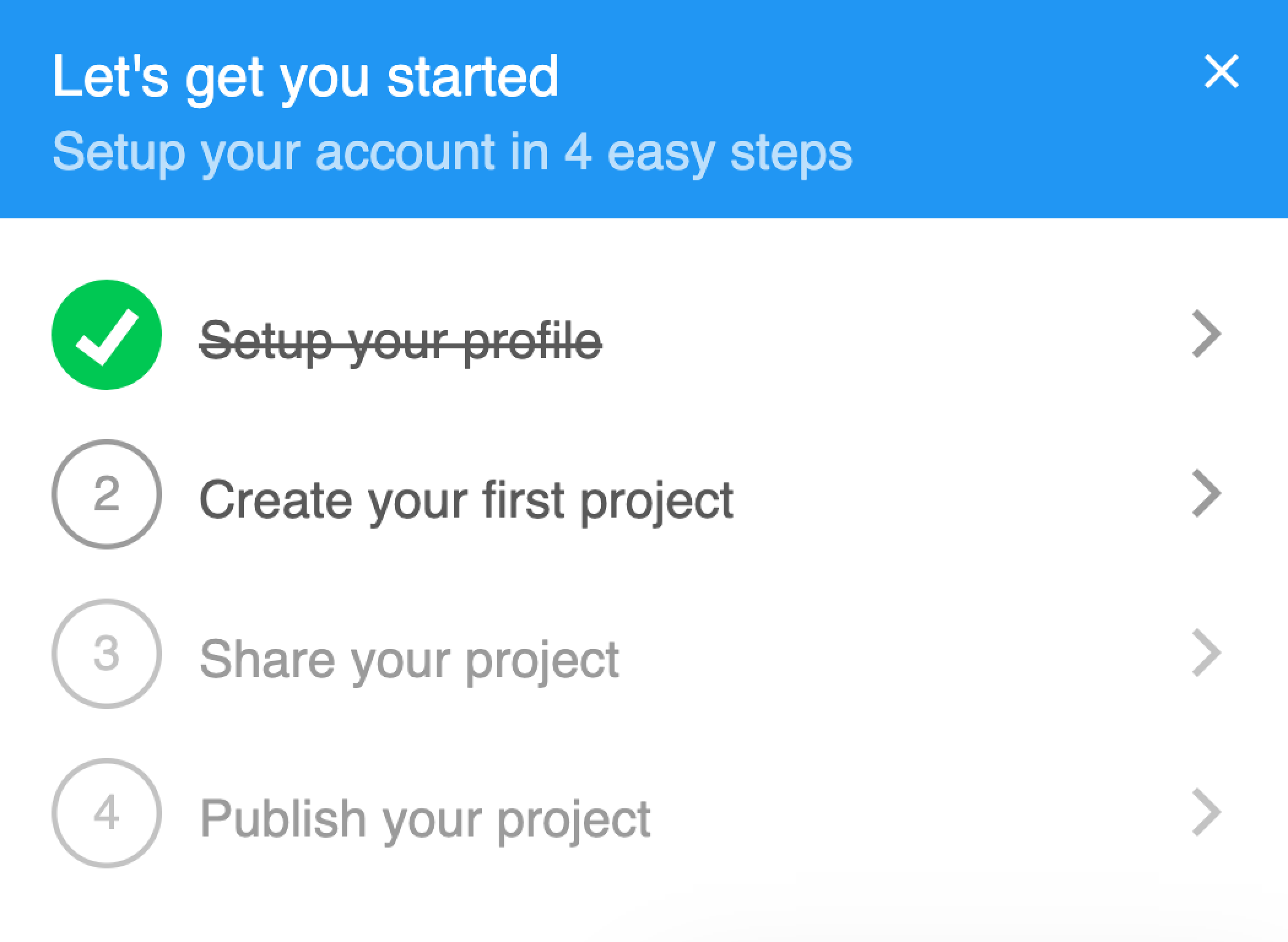
Here's how that looks in practice. Imagine a project-management tool where new users have to name a workspace, invite their teammates, and set permissions before they can create a single task, and predictably most of them quit somewhere in that setup. Moving the first task ahead of the invitations, then adding a three-step checklist that ends at "create your first task," hands users the win first and asks for the team setup later, once they've seen why it's worth the effort. The signup flow didn't get shorter by accident, it got reordered around the activation event, and that kind of reordering is usually where the biggest gains hide. You don't always need new features to lift activation, you often just need to change the order in which users meet the ones you already have.
The patterns that lift activation and the ones that quietly cap it are both well worn, so they're worth naming plainly.
Lifts activation
- Guidance tied to one first task, not a tour of the feature set
- A first win before you ask for setup, profiles, or teammates
- Prompts that reflect why this particular user signed up
- The shortest honest route to value, measured in clicks
Caps activation
- A walkthrough of every feature, front-loaded before a user has a reason to retain it
- Mandatory profiles or configuration wizards on step one
- Generic guidance that reads as noise and gets dismissed on sight
- A first win buried five clicks deep, however good the eventual payoff
The teams that win at activation keep their guidance brief, honest, and pointed straight at the fastest real route to value.
Start with one activation moment
Most activation work turns out to be a reordering job rather than a building job. Once you know the single event that separates the users who stay from the users who drift, the flow around it tends to rearrange itself: setup moves later, the first win moves earlier, and the guidance you add points at one task instead of touring the whole product. Ship that reordering to a single cohort, watch whether the rate moves, and you have a loop you can run again every month.
New users reach that moment faster when something in the app points them straight at it. HelpHero's no-code editor is one way to build that first checklist or walkthrough yourself.
Common questions about activation rate
What is a good user activation rate?
Good is less about the percentage than about whether the event you're counting predicts anything. Before comparing your rate to anyone else's, check that users who activate retain noticeably better than users who don't, because a rate built on a shallow click can read at seventy percent and still tell you nothing. Once the event holds up under that test, the only comparison worth making is your own line month over month, measured by cohort.
What's the difference between user activation and onboarding?
Onboarding is the process you run to help a new user get started, and activation is the result you want that process to produce. You can have a polished onboarding flow that still fails to activate the users who go through it, which is why the two are worth tracking as separate numbers. Onboarding is the effort you put in, activation is the outcome you get back.
What is an activation event?
An activation event is the specific, observable action you've chosen to represent a user reaching first value, usually paired with a threshold and a timeframe. Something like "shared a first document within three days" works well because you can count it and it lines up with users who go on to stay. A vague signal like "logged in twice" usually doesn't tell you anything useful.
What is the first time user experience (FTUE)?
The first time user experience is everything a new user meets on their very first visit: the empty screens, the opening prompt, the first decision you ask them to make. Practitioners use FTUE to talk about the design of that session, where activation describes its result, so the two are different views of the same few minutes. Auditing the FTUE screen by screen is usually how you find the reason an activation rate is stuck.
How do you improve the first time user experience?
Walk it yourself in the order a new user meets it, from a fresh account with no data in it, then remove or defer everything standing between the first screen and the first useful outcome. The usual culprits are a configuration wizard placed before any payoff, an empty dashboard offering no suggested next action, and a request to invite teammates before the product has done anything worth sharing. Fix those three in that order and the activation number normally follows without any new features.
Does improving user activation reduce churn?
Improving activation tends to reduce early churn, because the users most likely to leave in the first weeks are exactly the ones who never reached value. Activation sits upstream of retention, so lifting it gives every later stage of the funnel a stronger starting point. It isn't the only factor in churn, but it's often the earliest one you can actually influence.
What tools help improve user activation?
No tool helps until you're recording the activation event, so the first job is getting that one action into whatever analytics you already run. Without it you'll know a change felt better, but not whether it worked. Once the event exists, what moves the number is usually removing a step rather than adding a tool, and you judge each change against the cohort that came through before it.