Best Product Tour Software in 2026
Two different kinds of software answer to the name product tour. One guides customers who are already inside your app, the other shows your product to people who haven't signed up yet. Here's how to tell which one you're shopping for, what the in-app tools cost, and what's genuinely free.
 Jennifer Tee8 min read
On this page
Search for product tour software and the results mix two different product categories together without telling you they're different. Some of these tools build tours inside your product, for people who already signed up. Others build tours of your product, for people who haven't. Both are called product tours, both demo well, and buying from the wrong list leaves you with a tool that cannot reach the people you meant to reach.
So the first decision isn't which tool to buy. It's which side of the signup line your tour runs on. Once that's settled the list gets short quickly, and this piece covers both sides, what the in-app tools cost, and which parts of the category are actually free.
What counts as product tour software?
Anything that walks a person through an interface one step at a time, a definition broad enough to cover two jobs with almost nothing in common.
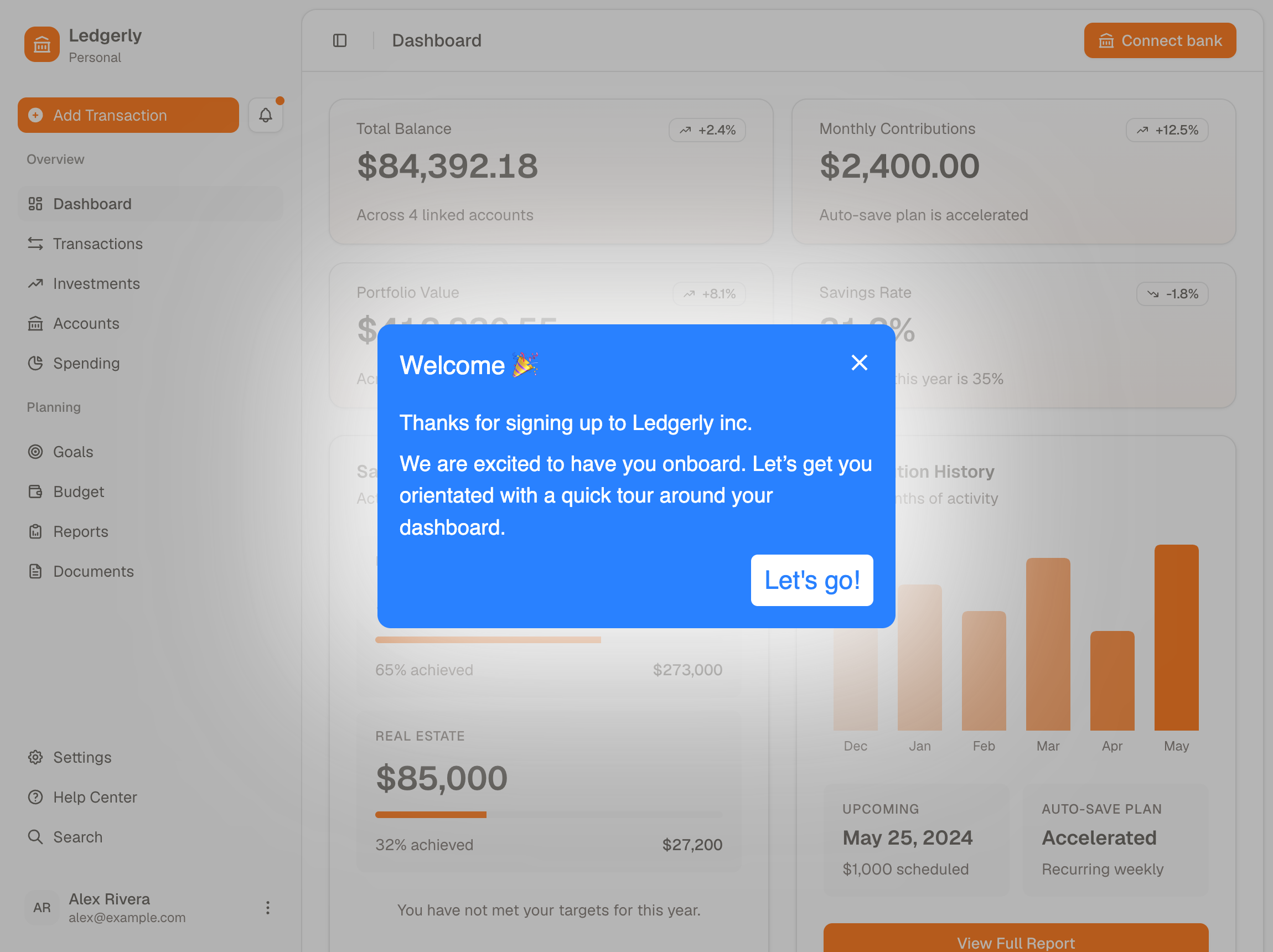
The first job is guiding customers inside your product. A new user signs up, lands on an empty screen, and a tour points at the three things worth doing first. The tools built for this add a small piece of JavaScript to your app and then run on top of your real interface: HelpHero, Userpilot, Appcues, UserGuiding, Product Fruits, Chameleon and Userflow all sit here. The buyer is usually product or customer success.
The second job is showing your product to people who haven't signed up yet. A prospect clicks a demo on your pricing page and clicks through a captured copy of your product, which means your real screens saved as a static lookalike. No account, and no work from your developers. Navattic is the clearest example, describing itself as "a no-code platform built for go-to-market teams to create interactive product demos without engineering help". The buyer is sales or marketing.
Both get filed under product tours, and the demo tools show up high in the results, which is why the list looks so muddled. They're not interchangeable: a demo tool runs on a static copy, so it can't show a customer their own account or touch their real data. An in-app tool runs on your live pages, so whoever you send it to has to reach the page first, and for most products that means logging in.
Which side of the signup line is your tour for?
Ask who is looking at the screen, then buy from the matching list. If they have an account and a password, you want in-app guidance. If they're deciding whether to give you their email, you want a demo tool.
That line isn't perfectly clean, and it's worth knowing where it blurs. Supademo covers both ends, saying it's used "across the entire customer journey", from marketing through to support. That's useful if you want one tool for the marketing site and the product, and the wrong trade if all your guidance runs after signup, because you'd be buying a demo engine to do an onboarding job. Chameleon crosses the same line from the other direction, offering AI Interactive Demos on its Growth plan.
It blurs the other way too, and most comparisons skip this. An in-app tour doesn't have to wait for a login screen, because all of these tools can start a specific tour from a link you send someone. Appcues calls it a permalink, good for "emails, chat messages, support docs, or anywhere you can place a link", and HelpHero and Userpilot do the same with a parameter on one of your own URLs. The person still has to land on a page where the tool is installed, so a link only gets past the login screen when the page behind it is public. It can reach someone with no account at all though, since HelpHero and Appcues both document an anonymous mode.
If you're still not sure which one you're looking at, two things give it away.
| What to look at | Interactive demo tool | In-app guidance tool |
|---|---|---|
| What the viewer clicks | A captured copy of your interface | Your live product |
| Who it can recognize | Nobody, there's no account | The signed-in user, so a two-day-old account and a two-year customer can be shown different things |
Navattic's own documentation is blunt about that first row. Its web captures are "HTML-based copies of any application that is accessed on a browser". Right for a prospect, useless for a customer with their own data on screen.
What does in-app product tour software cost?
Between $550 and $4,800 a year for the entry plan. Every figure below comes from each company's own pricing page, checked this week. MAU is monthly active users, and since each price covers a different number of them, every row says what it actually buys.
| Tool | Entry price per year | What it covers |
|---|---|---|
| HelpHero | $550 | 1,000 MAU, every feature included, unlimited seats |
| Product Fruits | $1,332 | 1,500 MAU, 3 seats |
| UserGuiding | $2,088 | From 2,000 MAU, 3 seats, 15 guides |
| Chameleon | $3,348 | 2,000 monthly tracked users, a different measure, and 10 live experiences |
| Userpilot | $3,588 | 2,000 MAU, 3 seats |
| Appcues Spark | $3,850 | 1,000 MAU, 10 experiences, teams of 25 or fewer |
| Userflow | $4,800 | 1,000 MAU, unlimited seats |
Reading straight down that column would mislead you, because the user counts aren't the same: HelpHero and Appcues quote at 1,000 users where Chameleon and Userpilot quote at 2,000. Our fuller breakdown of what these tools actually cost works each one out over a full year and covers the companies who publish no price.
Some of the biggest names never publish a price at all. WalkMe, Whatfix and Pendo's paid tiers are all quoted on request, so if you need a number this month they're out.
The demo tools aren't in that table because they charge in a completely different way, and it's worth knowing who that favors. They charge for each person building demos, not for each user who sees one, so Supademo starts at $38 a month for a single creator on yearly billing. That's less than anything in the table above. So if all you want is one clickable demo on your pricing page, you can spend a lot less than $550.
Is any product tour software free?
Three plans are genuinely free, and each comes with a catch worth understanding before you build on it.
Pendo is free up to 500 monthly active users, and it's a genuine free-forever plan rather than a trial, with product analytics and in-app guides included. The limit is the real constraint rather than the branding: 500 users is a very small product, and Pendo puts its own name on the NPS surveys and roadmaps rather than on the guides themselves. That's fine for finding out whether guidance helps at all, and something you'd outgrow quickly if it does.
Supademo has a free tier giving one creator five interactive demos. That's the demo side of the line rather than the in-app side, so it solves the marketing-site problem rather than the onboarding one.
Navattic's Starter plan is free for everyone, with one seat and one demo. That's enough to try the idea out on your pricing page, and not enough to run on.
Everything else is a trial rather than a free plan. HelpHero and Userflow both run 14 days with no credit card, and most others offer something similar. That's long enough to rebuild one real flow and see whether your users behave differently.
What to check before you commit
Look at how many seats you get before you look at the price. A plan that stops at three seats costs more than it looks the moment a fourth person needs access, and it's the most common way a cheap-looking tier turns out not to be. UserGuiding, Product Fruits and Userpilot all cap their entry plans at three, Appcues Spark caps the whole company at 25 people, and only HelpHero and Userflow leave seats uncounted.
Then check what you only get on a higher plan. Custom styling, A/B testing and localization sit above the entry plan on several of these tools, so the plan you priced isn't always the plan you'd end up on. The cheapest way to find out is to list the three things you intend to build first, then check each against the tier you're quoting.
Last, check how fast you can be live. Anything that installs as a piece of JavaScript is usually working within days, which matters more than it sounds when the alternative is procurement. We build HelpHero, so factor that in: our own no-code editor for tours, checklists and hotspots puts every feature on every plan and doesn't count seats, which is how we think these tools should be priced, whoever you end up buying from.
Start from the reader, not the shortlist
Almost every comparison in this category starts with the tools. Start with the person looking at the screen instead, because asking who they are splits a confusing list of search results into two clean shortlists.
If they're already a customer, shop the in-app group and let price and seats decide, because the feature sets have largely converged. If they're a prospect, shop the demo tools and ignore the onboarding ones entirely. And if you genuinely need both, know that you're buying two things. You can try HelpHero free for 14 days if the in-app group is the one you need.
Common questions about choosing product tour software
What is the best product tour software?
It depends which side of the signup line your tour runs on, and that matters more than any feature comparison. For guiding existing customers inside your product, the in-app group is HelpHero, Userpilot, Appcues, UserGuiding, Product Fruits, Chameleon and Userflow, where published entry prices run from $550 to $4,800 a year. For showing your product to prospects who haven't signed up, that's a different category led by tools like Navattic and Supademo.
Is there free product tour software?
Three options are genuinely free rather than trials. Pendo is free up to 500 monthly active users, on a free-forever plan that includes product analytics and in-app guides, though its NPS surveys and roadmaps carry Pendo branding. Supademo's free tier gives one creator five interactive demos, and Navattic's Starter plan is free with one seat and one demo, though both are demo software for prospects rather than in-app onboarding. Everything else in the category runs a free trial instead, typically 14 days, which is enough to rebuild one flow and see whether it changes behavior.
What's the difference between a product tour and an interactive demo?
A product tour runs inside your live product for a user who already has an account, and it can be targeted by who that user is. An interactive demo runs on a captured copy of your interface for a visitor who has no account, usually embedded on a marketing site. They look similar in a screenshot and solve opposite problems, which is why the same search returns both.
How much does product tour software cost?
Between $550 and $4,800 a year for the entry plan across the tools that publish a price, taken from each company's own pricing page and checked this week. The user counts differ, so those figures aren't strictly comparable: some quote at 1,000 monthly active users and others at 2,000. WalkMe, Whatfix and Pendo's paid tiers publish nothing at all and quote on request.
Do you need a developer to build a product tour?
Not for the building, but usually for the install. Every tool in the in-app group runs from a single JavaScript snippet that goes into your app once, which is a small job for a developer. After that the tours themselves are built in a point-and-click editor by whoever can see where users are getting stuck, with no developer time for each flow.