User Onboarding Tools in 2026: What They Actually Cost
Ten in-app onboarding tools, with every published price taken from the vendor's own pricing page this week. What each one costs, who refuses to say, and how to pick between them.
 Jennifer Tee12 min read
On this page
- What counts as a user onboarding tool?
- What do user onboarding tools cost in 2026?
- Why do so many of these tools not publish a price?
- Three kinds of tool wear the same label
- Who competes with each of these tools?
- Which tool fits which situation?
- What to insist on before you commit
- Where this leaves you
- Common questions about user onboarding tools
A user onboarding tool layers guidance over the product you've already built: tours, checklists, tooltips and hotspots that someone on your team can ship without touching the codebase. The category is crowded and most of it does much the same job, so the differences that actually matter are price, who the tool was built for, and whether the vendor will tell you what it costs before putting you on a call.
That last one matters more than it should. Three of the ten tools below won't quote a paid tier without a call, and the figures we could verify run from $550 a year to $3,850. Every number here came off the vendor's own pricing page this week, which is the part most roundups quietly skip, and each tool has its own side by side comparison with HelpHero if you want the detail behind a row.
What counts as a user onboarding tool?
Software that adds guidance to a product you've already got, without rebuilding anything to accommodate it. You drop in a snippet, then build the guidance in a visual editor instead of in your codebase.
That definition rules plenty of things in and out, though you'd never guess it from a search. Employee onboarding software like BambooHR or Rippling handles HR paperwork for new hires, which is a different job for a different buyer. Client onboarding platforms like Rocketlane manage implementation projects for services teams. Learning management systems deliver structured courses rather than in-product guidance. None of that is what a product team means by user onboarding, and yet they all turn up on the same results page.
What this article covers is narrower: in-app guidance for the people using your web software. The building blocks are much the same across every tool in the category. A tour walks someone through the interface, a checklist gives them a visible path to a first win, and hotspots or tooltips explain one thing at a time, right where it sits.
What do user onboarding tools cost in 2026?
Between $550 and $4,800 a year at entry level, across the seven figures we could verify. Vendors publish on different billing cycles, some monthly and some annual, so the first column puts them all on a yearly footing at each one's cheapest published option. The second column is the figure exactly as that vendor states it, so you can check our working.
| Tool | Cost per year | As the vendor publishes it | What it covers |
|---|---|---|---|
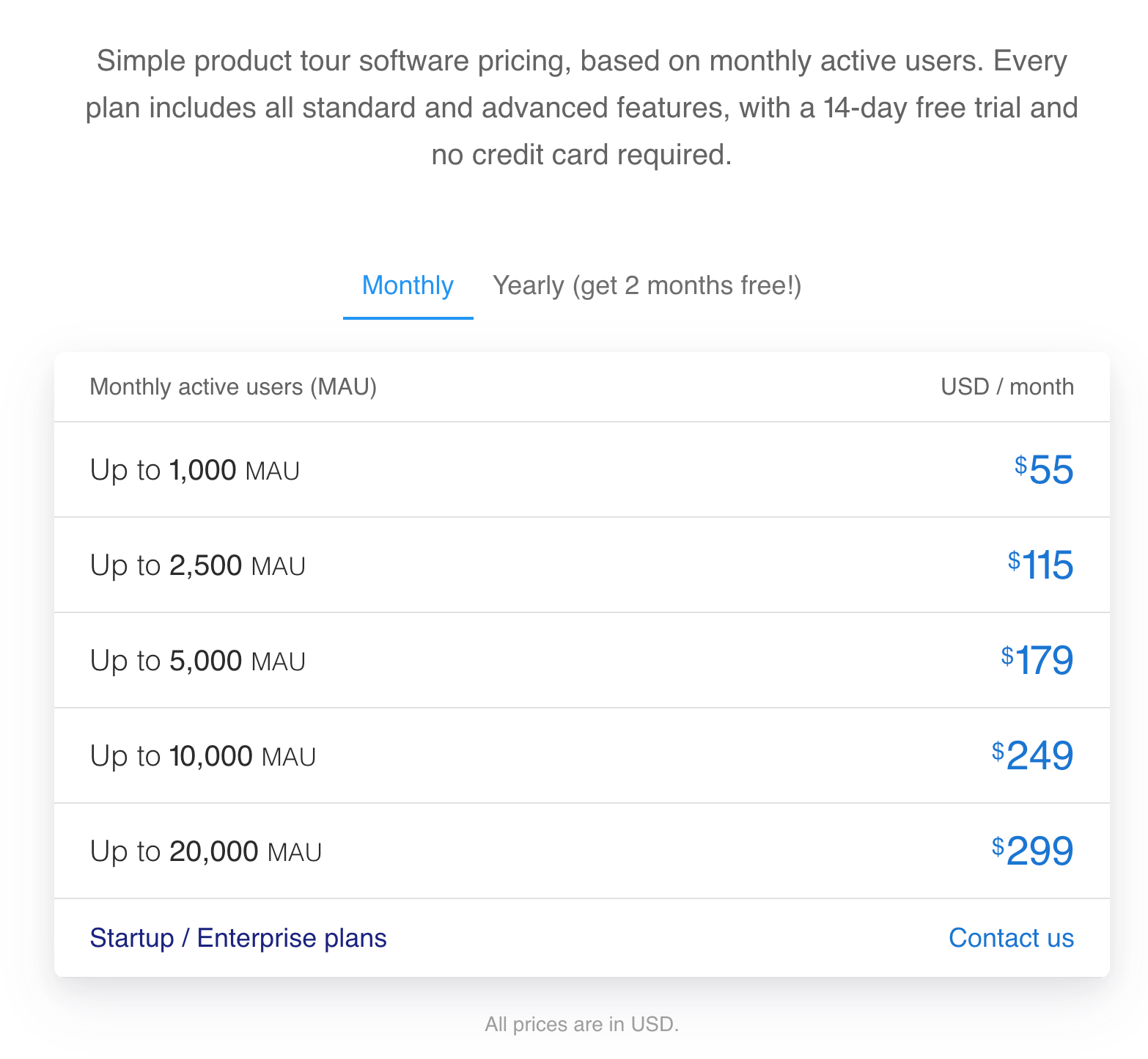
| HelpHero | $550 | $55 a month, or $550 billed yearly | 1,000 MAU, all features, unlimited seats |
| Product Fruits | $1,332 | $111 a month billed yearly, or $149 monthly | 1,500 MAU, 3 seats |
| UserGuiding | $2,088 | From $174 a month billed yearly | From 2,000 MAU, 3 seats, 15 guides |
| Chameleon | $3,348 | From $279 a month | 2,000 MTUs |
| Userpilot | $3,588 | $299 a month | 2,000 MAU, 3 seats |
| Appcues Spark | $3,850 | $3,600 a year, plus a $250 one time fee | 1,000 MAU, 10 experiences, teams of 25 or fewer |
| Userflow | $4,800 | $400 a month billed annually, or $500 monthly | 1,000 MAU, unlimited seats, 3 environments |
| Pendo | Free to 500 MAU | Paid tiers quoted on request | 500 MAU free, with Pendo branding |
| WalkMe | Not published | Quoted on request | No figures published |
| Whatfix | Not published | Quoted on request | No figures published |
One caveat on that first column. Chameleon and Userpilot publish monthly rates only, so their yearly figures are those rates times twelve, and if either offers an annual discount it isn't on their pricing page. HelpHero, Product Fruits, UserGuiding and Appcues all publish an annual option, and that's the figure shown.
Userflow needs a note of its own. It rebuilt its pricing for 2026 and now sells two products rather than plans: Adoption Studio, charged per 1,000 monthly active users, and Adoption Agent, charged by AI credit at $20 per hundred credits. Its own FAQ confirms the old Startup and Pro plans are closed to new customers and existing ones are grandfathered, so any figure you find in an older roundup is for a plan you can't buy any more. Studio is $500 a month, or $400 billed annually, covering 1,000 monthly active users, with additional volume charged at $30 per thousand up to 10,000 and less above that. Both products come with unlimited seats and a 14 day trial with no credit card.
The Appcues figure needs the same care. Spark is the only plan Appcues puts a price on, and it's sold to teams of 25 or fewer, covering 1,000 monthly active users and 10 published experiences. Start, Grow and Enterprise are all quoted on request, so if your team is bigger than 25 people that published number simply doesn't apply to you.
Finally, the volumes differ between vendors, which is why each row spells out what its price actually buys. Comparing a price that covers 1,000 users against one that covers 2,000, without mentioning the gap, is how these roundups end up misleading people.
The gap narrows if you negotiate, and it widens again on the tools that lock features behind higher tiers. Chameleon's Startup plan caps published experiences and seats, and UserGuiding and Userpilot both stop their entry plans at three. HelpHero goes the other way: every plan carries every feature, and seats are unlimited on all of them, so adding your whole team costs nothing extra. Only Userflow does the same on seats. That's worth knowing when you're comparing what the entry plans include rather than just what they cost.
Why do so many of these tools not publish a price?
Because they're selling to an enterprise procurement process, not to a product manager with a company card.
Appcues is a halfway case, publishing Spark and quoting its three larger plans. Pendo, WalkMe and Whatfix go further, and all three sell into big organizations where the deal comes with a security review, legal terms and a multi year commitment. In that world a published price is a negotiating position you'd rather not start from, and quoting per customer is simply how it's done. It isn't a trick, and treating it as one misreads the market.
It does change your evaluation though. If you've got two weeks to pick a tool and get onboarding live, a quote request that starts with a form and a discovery call is a real cost, whatever the eventual number turns out to be. If you're running a formal procurement anyway, it barely registers.
Pendo sits somewhere in the middle. It publishes one number, a free tier covering 500 monthly active users, and quotes everything above that. The free plan is genuinely usable and includes product analytics, so for a small product it's a strong offer. The catch is what happens when you hit the ceiling: Pendo's own pricing page says that going over the limit stops you creating new guides, surveys or segments until you upgrade, and the tier above has no published price. Our comparison of HelpHero and Pendo digs into that properly.
Three kinds of tool wear the same label
Three quite different products get sold under the same label.
In-app guidance tools are the specialists: onboarding is the whole product rather than one module of a bigger suite, so it tends to be the part they do best. HelpHero, Userflow, Product Fruits, UserGuiding and Chameleon sit here. They're bought by product and customer success teams, they install from a snippet, and they're usually live within days. If what you need is tours and checklists, this is the group to shop in, and price is the main thing separating them, because the feature sets have largely converged.
Product platforms bundle onboarding into a wider suite. Pendo and Userpilot both pair in-app guidance with product analytics, so you get the behavioral data and the guidance in one place. That's genuinely valuable if you don't already have analytics, and redundant if you do. Either way, you're paying for it.
Digital adoption platforms are aimed at enterprise IT rather than product teams. WalkMe and Whatfix reach beyond the browser into desktop applications and, in WalkMe's case, SAP, and they carry the security and governance machinery a large organization needs. If you're rolling software out to thousands of employees, that's the right category. If you're a SaaS team onboarding customers to one web app, it's an awful lot of platform to buy.
Appcues sits between the first two groups, closer to in-app guidance but with a fuller analytics story and enterprise plans quoted on request.
Who competes with each of these tools?
Mostly each other, though the useful answer differs by tool, because a shortlist drawn against Pendo looks nothing like one drawn against WalkMe.
Pendo competitors come in two shapes, which is what makes the question awkward to answer in a line. If the analytics half is what you want, Userpilot is the closest match in this set, and Amplitude or Mixpanel do that job better with no guidance attached at all. If the guidance half is what you want, without paying for a suite around it, HelpHero, Product Fruits and UserGuiding all cover it at a published price. Which half you actually care about decides the list.
Appcues competitors cluster more tightly, because Appcues sits between the specialists and the platforms rather than at either end. Userpilot and Chameleon are nearest on positioning and buyer, HelpHero and Product Fruits undercut it substantially at the entry tier, and Pendo enters the comparison whenever analytics is part of the requirement.
WalkMe and Whatfix mostly compete with each other, and with the enterprise suites, rather than with anything else on this page. Both reach into desktop software, both sell through procurement, and neither publishes a figure. A product team weighing WalkMe competitors against a tool like Userflow is usually comparing across two categories without having noticed.
Userpilot competitors and Chameleon competitors overlap almost entirely with the two lists above, which is a fair summary of how converged this category has become. The decision that matters is rarely which vendor, but which of the three kinds of tool you actually need.
Which tool fits which situation?
Honestly, several of them would work for you. What usually decides it is your budget, the tools you already run, and how fast you need to move.
If you already have product analytics, buying a tool that bundles more of it means paying twice. Amplitude, Mixpanel or PostHog already answer the behavioral questions, so an in-app guidance tool that reports on its own tours and leaves the rest alone is the cheaper and cleaner fit.
If you have no analytics and no plans to buy any, Pendo or Userpilot look better than their price alone suggests, because you're buying two things at once.
If your users are employees rather than customers, and the software they need help with includes desktop applications, WalkMe and Whatfix are built for exactly that, and the in-app guidance tools aren't.
If you're a tech startup picking a tool on a deadline, the constraint is usually time and headcount rather than features. Pendo's paid tiers, WalkMe and Whatfix are all quoted on request, so they're out if you need an answer this month, whatever the number would have turned out to be. Appcues Spark is the subtler trap: it's the cheapest way into Appcues, but it stops at 1,000 monthly active users and is sold only to teams of 25 or fewer. That's the same user ceiling HelpHero's $550 plan carries, for $3,850, and the tiers above Spark aren't priced publicly, so growing into your second thousand users means a quote rather than an upgrade. That leaves the in-app guidance group, where a snippet gets you live in days and the published entry prices run from $550 to $4,800 a year.
If budget is what's binding, remember the published entry prices differ by close to ninefold, and the tools at the cheap end aren't missing the core features. HelpHero is the cheapest published entry point in this set, and every plan includes every feature, which usually matters more than the headline number.
We build HelpHero, so read that last paragraph with the appropriate pinch of salt. What we'd say to anyone evaluating is this: the features that genuinely differ between these tools are narrower than the marketing suggests, so start from what you're willing to spend and what your team can realistically maintain.
What to insist on before you commit
- A price you can see before a call, or a clear reason why not
- Every feature you need on the plan you can afford, rather than one tier up
- Enough seats for everyone who'll touch it, without a per person charge
- Installation that doesn't need an engineer for every new flow
- Targeting rules, so guidance reaches the people it applies to
- Step level analytics, so you can see where people drop out
- A trial you can start yourself, without a discovery call
I've kept that list deliberately short. Most evaluation spreadsheets in this category run to forty rows and end up comparing features nobody ever uses, because the tools really are that similar. The six above are the ones that change what owning onboarding feels like day to day.
Where this leaves you
The category has converged on a common set of features. Tours, checklists and tooltips work much the same everywhere, and any of these tools will get guidance in front of your users. What still separates them is who they're built for, whether analytics comes bundled, and what you have to go through to find out the price.
So shop on fit and cost rather than feature counts. Work out first whether you need a guidance tool, a product platform or a digital adoption platform, because that one decision knocks out most of the list. Then compare the two or three left on what their entry plan actually includes, at the volume you actually have.
If you want to see the cheap end of that range working in your own app, HelpHero's pricing starts with a free trial, and you can have a tour live the same afternoon.
Common questions about user onboarding tools
What are user onboarding tools?
User onboarding tools are software that adds guidance to a product you already have, without rebuilding it. You install a JavaScript snippet, then build tours, checklists, tooltips and hotspots in a visual editor rather than in your codebase. They're bought mainly by product and customer success teams who want to improve activation without spending engineering time on every flow.
How much do user onboarding tools cost?
Between $550 and $3,850 a year at entry level among the tools that publish a price, checked against each vendor's own pricing page in August 2026. HelpHero starts at $55 a month for 1,000 monthly active users, Product Fruits at $96 a month for 1,500, UserGuiding at $174 a month billed yearly, Chameleon from $279 a month, Userpilot at $299 a month, and Appcues at $3,600 a year plus a $250 one time fee on its Spark plan, which only teams of 25 or fewer can buy. Pendo, WalkMe and Whatfix quote their paid tiers on request.
Which user onboarding tools have a free plan?
Pendo offers a free tier covering up to 500 monthly active users, which includes product analytics and in-app guides, with Pendo branding on roadmaps and surveys. UserGuiding lists a free tier as well. Most of the others run free trials instead, which let you build and preview before paying but do expire. Check what happens at the ceiling of any free plan before you build on it, since some stop you creating new content rather than degrading quietly.
What's the best onboarding solution for tech startups?
There isn't a single answer, but the shortlist is shorter than the category makes it look. A startup normally needs guidance live quickly, at a price it can see, without paying again every time someone joins the team. That rules out the three tools quoting paid tiers on request, Pendo above its free tier plus WalkMe and Whatfix. It largely rules out Appcues as well: Spark is the only plan Appcues prices publicly, and it holds you to 1,000 monthly active users and a company of 25 or fewer, with every tier above it quoted on request. What remains is the in-app guidance group: HelpHero at $550 a year, Product Fruits at $1,332, UserGuiding at $2,088 and Chameleon from $3,348, all installed from a snippet and live in days rather than quarters. Read the seat column before the price, because only HelpHero and Userflow leave seats uncounted.
Who are Pendo's main competitors?
Userpilot is the closest, since both pair product analytics with in-app guidance and both sell to product teams. Appcues and Chameleon compete on the guidance side without matching Pendo's analytics depth. At the cheaper end, HelpHero, Product Fruits and UserGuiding all publish entry prices well below what Pendo quotes once you pass its free tier at 500 monthly active users. If the analytics is the part you actually want, a dedicated tool such as Amplitude or Mixpanel paired with a cheaper guidance tool is the option most shortlists leave out.
Who competes with Appcues?
Userpilot and Chameleon sit closest on positioning and buyer, and Pendo joins the comparison whenever bundled product analytics is part of the requirement. On price the gap is wide. Appcues publishes $3,600 a year for Spark plus a $250 one time fee, and only teams of 25 or fewer can buy it, where HelpHero starts at $550 a year and Product Fruits at $1,332 with no headcount cap on either. For a small product team that difference usually settles it before the feature comparison starts.
What is the difference between user onboarding and employee onboarding software?
They share a word and nothing else. User onboarding tools guide customers through your product with in-app tours and checklists, and they're bought by product teams. Employee onboarding software handles HR processes for new hires, things like paperwork, payroll setup and training courses, and it's bought by people teams. Search results mix the two constantly, so check which one a roundup is actually talking about.
Do I need a separate analytics tool alongside a user onboarding tool?
It depends which tool you pick. Pendo and Userpilot bundle product analytics with their guidance, so they can replace a separate tool if you don't already have one. Tools focused on in-app guidance, HelpHero included, report on how their own tours and checklists perform and expect you to send events to whatever analytics you already run. If you've got Amplitude, Mixpanel or PostHog in place, that bundled analytics is something you'd be paying for twice.